Chirpy博客搭建全流程
本文记录从本地搭建到上线部署的 Chirpy 博客实践流程。
本文记录了使用 Jekyll + Chirpy 主题搭建并部署个人博客的完整过程,涵盖本地开发环境配置、核心配置文件修改以及博客发布流程,适合作为一份可复用的实践指南。
实现效果
- 基于 Chirpy 主题的个人博客
- GitHub Pages 在线访问
- 本地 Markdown 文章编写与预览
- Git 推送自动部署
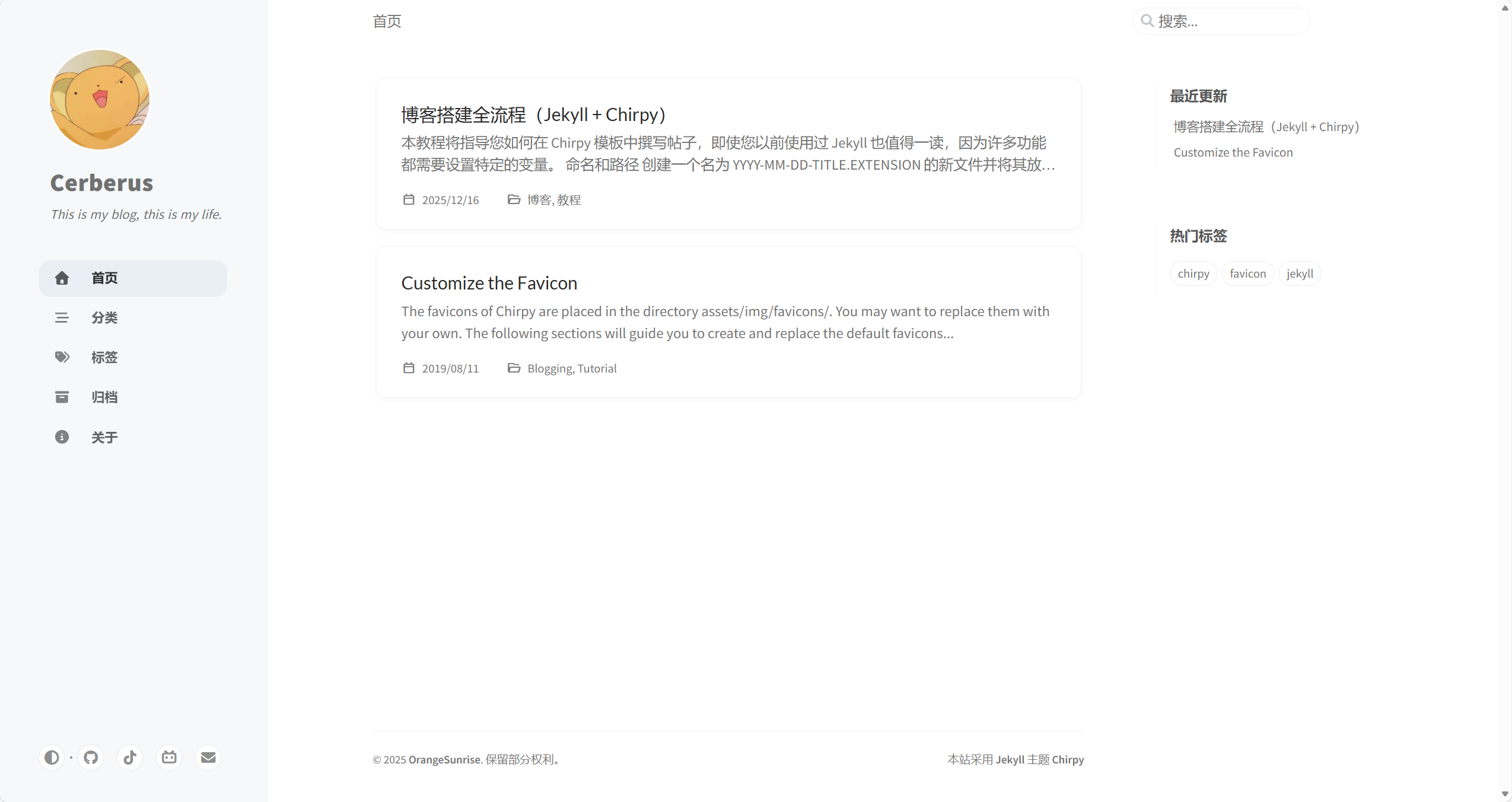 博客首页效果预览
开发环境
| 项目 | 版本 / 说明 |
|---|---|
| OS | Windows 11 |
| Linux 子系统 | WSL2 + Ubuntu 24.04 |
| 编辑器 | VS Code |
| git | 在 Ubuntu 24.04 中安装 git |
环境准备
WSL2 + Ubuntu 24.04 + Git + VSCode
安装教程:链接
项目拉取
下面内容来源于Getting Started, Chirpy
1
2
3
4
5
6
7
8
9
10
11
12
13
14
15
16
17
18
19
## Creating a Site Repository

When creating your site repository, you have two options depending on your needs:

### Option 1. Using the Starter (Recommended)

This approach simplifies upgrades, isolates unnecessary files, and is perfect for users who want to focus on writing with minimal configuration.

1. Sign in to GitHub and navigate to the [**starter**][starter].
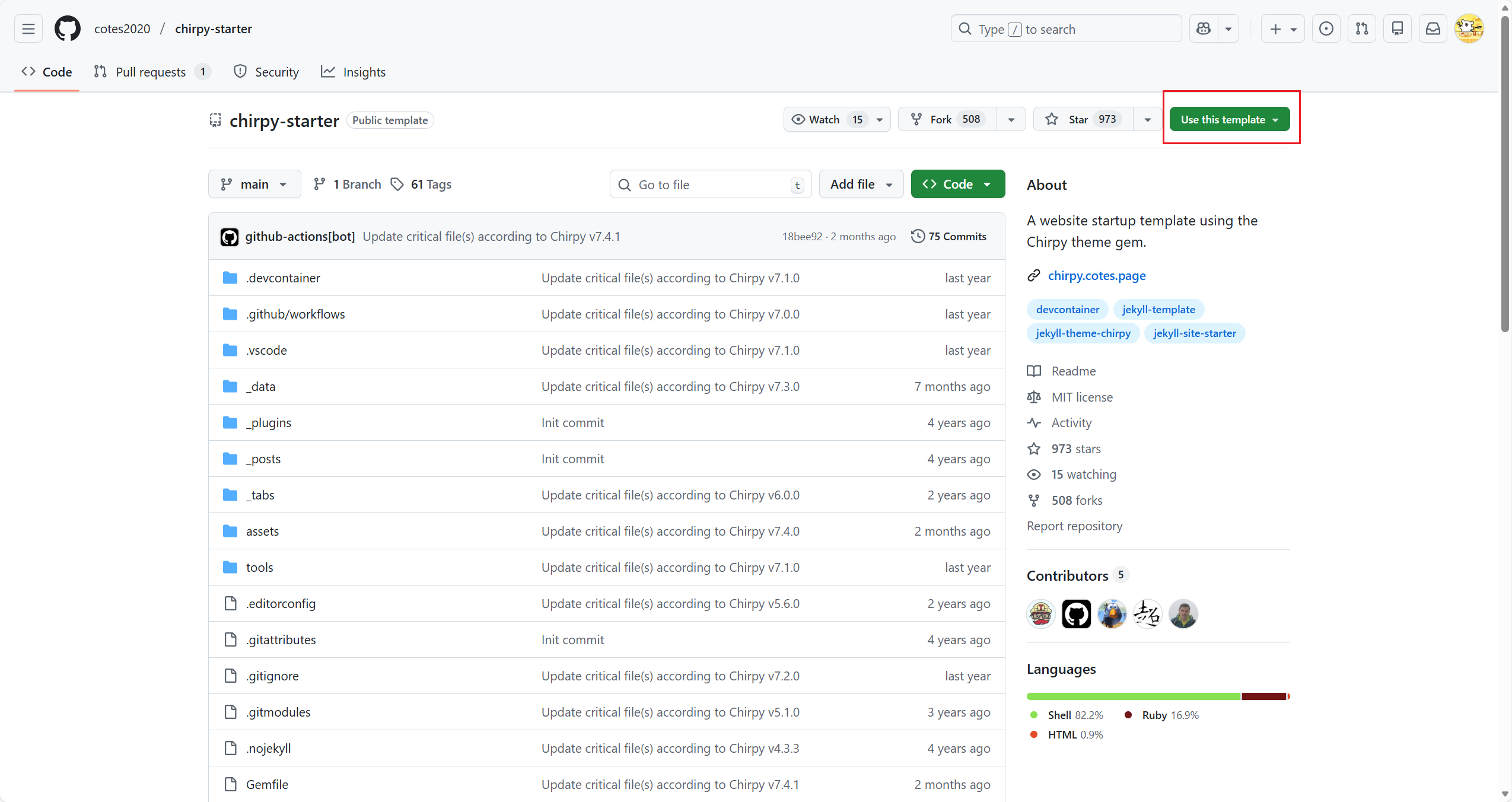
2. Click the <kbd>Use this template</kbd> button and then select <kbd>Create a new repository</kbd>.
3. Name the new repository `<username>.github.io`, replacing `username` with your lowercase GitHub username.

### Option 2. Forking the Theme

This approach is convenient for modifying features or UI design, but presents challenges during upgrades. So don't try this unless you are familiar with Jekyll and plan to heavily modify this theme.

1. Sign in to GitHub.
2. [Fork the theme repository](https://github.com/cotes2020/jekyll-theme-chirpy/fork).
3. Name the new repository `<username>.github.io`, replacing `username` with your lowercase GitHub username.
不要 fork 主题仓库
👉 用 Option 1:Use this template(Starter,推荐)
| 对比项 | ✅ Option 1:Use this template(Recommended) | ❌ Option 2:Fork 主题(不推荐) |
|---|---|---|
| 适合人群 | 写博客 / 文档站点的绝大多数人 | 深度魔改主题的高级用户 |
| 使用方式 | 基于官方模板创建仓库 | Fork 官方主题仓库 |
| 主题角色 | 作为依赖存在 | 主题 = 你的项目本身 |
| 升级体验 | ⭐⭐⭐⭐⭐ 无痛升级 | ⭐ 痛苦(大量 merge 冲突) |
| 维护成本 | 很低 | 很高 |
| 仓库结构 | 干净,只关注内容 | 混杂主题源码 |
| 新功能跟进 | 非常容易 | 很困难 |
| 官方支持 | 完全匹配官方文档 | 很多文档不再适用 |
| 翻车概率 | 极低 | 极高 |
| 后悔概率 | 😄 几乎没有 | 😭 90% 会后悔 |
整体流程只有一句话: 先在 GitHub 上用模板创建仓库 → 再拉取到本地开发
不要反过来在本地新建仓库再推 GitHub。
第一步:在 GitHub 上创建仓库(不要在本地)
打开 Starter 模板仓库(官方给你的那个 starter)
点击右上角:
1
Use this template → Create a new repository
仓库名填写:
1
<你的GitHub用户名>.github.io
必须:1. 全小写;2. 和 GitHub 用户名一模一样
✔ 这样 GitHub Pages 才能自动生效
第二步:确认 GitHub Pages 状态
创建完仓库后:
1
Settings → Pages
你应该看到:
1
Your site is live at https://<username>.github.io
第三步:项目拉取
例子:将我的github上面的
https://github.com/OrangeSunrise/orangesunrise.github.io拉取到/home/jianhui/web_project下面
在你的 Linux / WSL 环境中,按下面步骤来即可 👍
先确认目标目录存在
1
2
mkdir -p /home/jianhui/web_project
cd /home/jianhui/web_project
从 GitHub 拉取仓库
1
git clone https://github.com/OrangeSunrise/orangesunrise.github.io.git
完成后目录结构会是:
1
2
3
4
5
6
/home/jianhui/web_project/
└── orangesunrise.github.io/
    ├── _config.yml
    ├── _posts/
    ├── Gemfile
    └── ...
验证是否成功
1
2
cd orangesunrise.github.io
git status
如果看到:
1
2
On branch main
Your branch is up to date with 'origin/main'.
说明拉取成功 ✅
安装运行依赖
以下操作均在 WSL2 Ubuntu 终端中执行。
1. 安装 Ruby 和编译工具
Jekyll 依赖 Ruby,部分插件需要 C 编译器,因此先安装 Ruby 及基础构建工具:
1
2
sudo apt update
sudo apt install ruby-full build-essential zlib1g-dev -y
2. 配置用户级 Gem 安装路径
不要用 sudo 全局安装 Gem,否则可能破坏系统组件或引发权限冲突。通过环境变量将 Gem 安装到用户家目录:
1
2
3
4
echo '# Install Ruby Gems to ~/gems' >> ~/.bashrc
echo 'export GEM_HOME="$HOME/gems"' >> ~/.bashrc
echo 'export PATH="$HOME/gems/bin:$PATH"' >> ~/.bashrc
source ~/.bashrc
3. 换源并安装 Jekyll / Bundler
国内网络环境下,建议将 RubyGems 源替换为国内镜像:
1
2
3
4
5
6
7
# 换源
gem sources --remove https://rubygems.org/
gem sources -a https://gems.ruby-china.com/
gem sources  # 验证源已切换

# 安装 Jekyll 和 Bundler(不加 sudo)
gem install jekyll bundler
💡 此步骤可能需要几分钟,因为部分 Gem 需要现场编译 C 扩展。
4. 验证安装
1
2
3
4
ruby -v
gem -v
bundler -v
jekyll -v
5. 安装项目依赖并启动本地预览
进入项目目录,安装 Gemfile 中声明的依赖后启动服务:
1
2
3
4
5
cd /home/jianhui/web_project/orangesunrise.github.io

bundle install

bundle exec jekyll serve
启动成功后,浏览器访问 http://localhost:4000 即可预览博客。
后续每次写文章前,先本地预览确认效果正常,再推送到 GitHub。
核心配置文件一览
| 序号 | 文件 | 作用 |
|---|---|---|
| 1 | _config.yml | 站点全局配置 |
| 2 | Gemfile | Ruby 依赖管理 |
| 3 | assets/img/favicons/ | 网站图标 |
| 4 | _data/locales/ | 多语言配置 |
| 5 | _data/authors.yml | 作者信息 |
| 6 | _data/contact.yml | 联系方式 |
| 7 | _data/media.yml | 媒体类型 |
| 8 | _data/share.yml | 分享平台 |
| 9 | _posts/ | 博客文章 |
配置文件修改说明
_config.yml
修改的内容
1
2
3
4
5
6
7
8
9
10
11
12
13
14
15
16
17
18
19
20
21
22
23
24
25
26
27
28
29
30
31
32
33
34
35
36
37
38
39
40
41
42
43
44
45
46
47
48
49
50
51
52
53
54
55
56
57
58
59
60
61
62
63
64
65
66
67
68
69
70
71
72
73
74
# 修改博客展示语言
lang: zh-CN

# 修改时区设置
timezone: Asia/Shanghai

# 修改博客名字和个性签名
title: Cerberus # the main title

tagline: This is my blog, this is my life. # it will display as the subtitle

description: >- # used by seo meta and the atom feed
  This is my blog, this is my life.

# 修改博客主页地址,url地址结尾不要加"/",baseurl为空即可
url: "https://orangesunrise.github.io"
baseurl: ""

# 修改个人信息
github:
  username: OrangeSunrise # change to your GitHub username

social:
  # Change to your full name.
  # It will be displayed as the default author of the posts and the copyright owner in the Footer
  name: OrangeSunrise
  email: Jianhui_Chang@outlook.com # change to your email address
  links:
    # The first element serves as the copyright owner's link
    # - https://twitter.com/username # change to your Twitter homepage
    - https://github.com/OrangeSunrise/ # change to your GitHub homepage

# 修改cos(对象存储地址),建议不修改这里
cdn:

# 修改主页头像,如果使用cos需要配置/assets前面的链接
avatar: "/assets/favicon.svg"

# 安装jekyll_compose插件,修改这里的配置(jekyll_compose插件可以快速生成文章的头信息,需要单独安装)
jekyll_compose:
  default_front_matter:
    posts:
      author: cerberus
      categories:
      tags:
      description:

# 开启文章的评论
# 前提:需要github安装插件
# 教程链接:https://orangesunrise.github.io/posts/comments-with-giscus-in-chirpy/

comments:
  # Global switch for the post-comment system. Keeping it empty means disabled.
  provider: giscus # [disqus | utterances | giscus]
  # The provider options are as follows:
  disqus:
    shortname: # fill with the Disqus shortname. › https://help.disqus.com/en/articles/1717111-what-s-a-shortname
  # utterances settings › https://utteranc.es/
  utterances:
    repo: # <gh-username>/<repo>
    issue_term: # < url | pathname | title | ...>
  # Giscus options › https://giscus.app
  giscus:
    repo: OrangeSunrise/orangesunrise.github.io # <gh-username>/<repo>
    repo_id: R_kgDOQoUIvw
    category: General
    category_id: DIC_kwDOQoUIv84Czzxt
    mapping: pathname # optional, default to 'pathname'
    strict: 0 # optional, default to '0'
    input_position: bottom # optional, default to 'bottom'
    lang: zh-CN # optional, default to the value of `site.lang`
    reactions_enabled: 1 # optional, default to the value of `1`

# 其余保持默认即可
修改后的文件
1
2
3
4
5
6
7
8
9
10
11
12
13
14
15
16
17
18
19
20
21
22
23
24
25
26
27
28
29
30
31
32
33
34
35
36
37
38
39
40
41
42
43
44
45
46
47
48
49
50
51
52
53
54
55
56
57
58
59
60
61
62
63
64
65
66
67
68
69
70
71
72
73
74
75
76
77
78
79
80
81
82
83
84
85
86
87
88
89
90
91
92
93
94
95
96
97
98
99
100
101
102
103
104
105
106
107
108
109
110
111
112
113
114
115
116
117
118
119
120
121
122
123
124
125
126
127
128
129
130
131
132
133
134
135
136
137
138
139
140
141
142
143
144
145
146
147
148
149
150
151
152
153
154
155
156
157
158
159
160
161
162
163
164
165
166
167
168
169
170
171
172
173
174
175
176
177
178
179
180
181
182
183
184
185
186
187
188
189
190
191
192
193
194
195
196
197
198
199
200
201
202
203
204
205
206
207
208
209
210
211
212
213
214
215
216
217
218
219
220
221
222
223
224
225
226
227
228
229
230
231
232
233
234
235
236
237
238
# The Site Configuration
# Import the theme
theme: jekyll-theme-chirpy
# The language of the webpage › http://www.lingoes.net/en/translator/langcode.htm
# If it has the same name as one of the files in folder `_data/locales`, the layout language will also be changed,
# otherwise, the layout language will use the default value of 'en'.
lang: zh-CN
# Change to your timezone › https://zones.arilyn.cc
timezone: Asia/Shanghai
# jekyll-seo-tag settings › https://github.com/jekyll/jekyll-seo-tag/blob/master/docs/usage.md
# ↓ --------------------------
title: Cerberus # the main title
tagline: This is my blog, this is my life. # it will display as the subtitle
description: >- # used by seo meta and the atom feed
This is my blog, this is my life.
# Fill in the protocol & hostname for your site.
# E.g. 'https://username.github.io', note that it does not end with a '/'.
url: "https://orangesunrise.github.io"
baseurl: ""
github:
username: OrangeSunrise # change to your GitHub username
twitter:
username: twitter_username # change to your Twitter username
social:
# Change to your full name.
# It will be displayed as the default author of the posts and the copyright owner in the Footer
name: OrangeSunrise
email: Jianhui_Chang@outlook.com # change to your email address
links:
# The first element serves as the copyright owner's link
# - https://twitter.com/username # change to your Twitter homepage
- https://github.com/OrangeSunrise/ # change to your GitHub homepage
# Uncomment below to add more social links
# - https://www.facebook.com/username
# - https://www.linkedin.com/in/username
# Site Verification Settings
webmaster_verifications:
google: # fill in your Google verification code
bing: # fill in your Bing verification code
alexa: # fill in your Alexa verification code
yandex: # fill in your Yandex verification code
baidu: # fill in your Baidu verification code
facebook: # fill in your Facebook verification code
# ↑ --------------------------
# The end of `jekyll-seo-tag` settings
# Web Analytics Settings
analytics:
google:
id: # fill in your Google Analytics ID
goatcounter:
id: # fill in your GoatCounter ID
umami:
id: # fill in your Umami ID
domain: # fill in your Umami domain
matomo:
id: # fill in your Matomo ID
domain: # fill in your Matomo domain
cloudflare:
id: # fill in your Cloudflare Web Analytics token
fathom:
id: # fill in your Fathom Site ID
# Page views settings
pageviews:
provider: # now only supports 'goatcounter'
# Prefer color scheme setting.
#
# Note: Keep empty will follow the system prefer color by default,
# and there will be a toggle to switch the theme between dark and light
# on the bottom left of the sidebar.
#
# Available options:
#
# light — Use the light color scheme
# dark — Use the dark color scheme
#
theme_mode: # [light | dark]
# The CDN endpoint for media resources.
# Notice that once it is assigned, the CDN url
# will be added to all media resources (site avatar, posts' images, audio and video files) paths starting with '/'
#
# e.g. 'https://cdn.com'
cdn:
# jekyll_compose
jekyll_compose:
default_front_matter:
posts:
author: cerberus
categories:
tags:
description:
# 修改主页头像,如果使用cos需要配置/assets前面的链接
avatar: "/assets/favicon.svg"
# The URL of the site-wide social preview image used in SEO `og:image` meta tag.
# It can be overridden by a customized `page.image` in front matter.
social_preview_image: # string, local or CORS resources
# boolean type, the global switch for TOC in posts.
toc: true
comments:
# Global switch for the post-comment system. Keeping it empty means disabled.
provider: giscus # [disqus | utterances | giscus]
# The provider options are as follows:
disqus:
shortname: # fill with the Disqus shortname. › https://help.disqus.com/en/articles/1717111-what-s-a-shortname
# utterances settings › https://utteranc.es/
utterances:
repo: # <gh-username>/<repo>
issue_term: # < url | pathname | title | ...>
# Giscus options › https://giscus.app
giscus:
repo: OrangeSunrise/orangesunrise.github.io # <gh-username>/<repo>
repo_id: R_kgDOQoUIvw
category: General
category_id: DIC_kwDOQoUIv84Czzxt
mapping: pathname # optional, default to 'pathname'
strict: 0 # optional, default to '0'
input_position: bottom # optional, default to 'bottom'
lang: zh-CN # optional, default to the value of `site.lang`
reactions_enabled: 1 # optional, default to the value of `1`
# Self-hosted static assets, optional › https://github.com/cotes2020/chirpy-static-assets
assets:
self_host:
enabled: # boolean, keep empty means false
# specify the Jekyll environment, empty means both
# only works if `assets.self_host.enabled` is 'true'
env: # [development | production]
pwa:
enabled: true # The option for PWA feature (installable)
cache:
enabled: true # The option for PWA offline cache
# Paths defined here will be excluded from the PWA cache.
# Usually its value is the `baseurl` of another website that
# shares the same domain name as the current website.
deny_paths:
# - "/example" # URLs match `<SITE_URL>/example/*` will not be cached by the PWA
paginate: 10
# The base URL of your site
baseurl: ""
# ------------ The following options are not recommended to be modified ------------------
kramdown:
footnote_backlink: "↩︎"
syntax_highlighter: rouge
syntax_highlighter_opts: # Rouge Options › https://github.com/jneen/rouge#full-options
css_class: highlight
# default_lang: console
span:
line_numbers: false
block:
line_numbers: true
start_line: 1
collections:
tabs:
output: true
sort_by: order
defaults:
- scope:
path: "" # An empty string here means all files in the project
type: posts
values:
layout: post
comments: true # Enable comments in posts.
toc: true # Display TOC column in posts.
# DO NOT modify the following parameter unless you are confident enough
# to update the code of all other post links in this project.
permalink: /posts/:title/
- scope:
path: _drafts
values:
comments: false
- scope:
path: ""
type: tabs # see `site.collections`
values:
layout: page
permalink: /:title/
sass:
style: compressed
compress_html:
clippings: all
comments: all
endings: all
profile: false
blanklines: false
ignore:
envs: [development]
exclude:
- "*.gem"
- "*.gemspec"
- docs
- tools
- README.md
- LICENSE
- purgecss.js
- "*.config.js"
- "package*.json"
jekyll-archives:
enabled: [categories, tags]
layouts:
category: category
tag: tag
permalinks:
tag: /tags/:name/
category: /categories/:name/
Gemfile
修改的内容
1
2
3
4
5
# 更换镜像源
source "https://mirrors.tuna.tsinghua.edu.cn/rubygems/"

# 添加插件配置
gem 'jekyll-compose', group: [:jekyll_plugins]
修改后的文件
1
2
3
4
5
6
7
8
9
10
11
12
13
14
15
16
17
18
# frozen_string_literal: true

# source "https://rubygems.org"
source "https://mirrors.tuna.tsinghua.edu.cn/rubygems/"

gem "jekyll-theme-chirpy", "~> 7.4", ">= 7.4.1"

gem "html-proofer", "~> 5.0", group: :test

platforms :mingw, :x64_mingw, :mswin, :jruby do
  gem "tzinfo", ">= 1", "< 3"
  gem "tzinfo-data"
end

gem "wdm", "~> 0.2.0", :platforms => [:mingw, :x64_mingw, :mswin]

gem 'jekyll-compose', group: [:jekyll_plugins]
favicons(目录)
favicons 目录用于存放网站的各类图标资源,包括浏览器标签页图标、书签图标以及移动端快捷方式图标等。
Chirpy 主题已预置完整的 favicon 结构,你只需要按照规范 替换对应图片文件 即可完成自定义,无需额外修改配置文件。
具体制作与替换方法可参考后续的 Favicon 自定义教程(此处暂时占位,后续补充链接)。
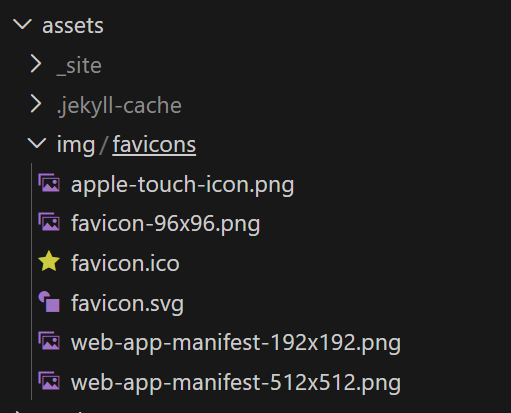 替换后的 favicon 文件列表
locales(目录)
locales 目录用于配置站点的界面语言与本地化文案,包括导航栏、按钮、提示信息等内容。
Chirpy 主题官方仓库已提供多语言支持文件,你可以直接从以下渠道获取:
- Chirpy 官方仓库:下载对应语言的
yml文件 - 百度网盘:下载链接
下载完成后,将所需语言文件放入 _data/locales/ 目录,并在 _config.yml 中指定默认语言,即可生效。
通常只需保留正在使用的语言文件,其余语言可删除,以保持目录结构简洁。
authors.yml
修改的内容
1
2
3
4
5
6
7
8
9
# 添加个人信息
cerberus:
  name: Cerberus
  twitter: Cerberus
  url: https://github.com/OrangeSunrise/

# author_id是文章头文件信息里面需要填写的作者
# url可以设置为个人主页链接(github)
# full name是文章生成后展示的作者名字
修改后的文件
1
2
3
4
5
6
7
8
9
10
11
12
13
14
15
16
17
18
19
20
21
22
23
## Template › https://github.com/jekyll/jekyll-seo-tag/blob/master/docs/advanced-usage.md#setting-author-url
# -------------------------------------
# {author_id}:
#   name: {full name}
#   twitter: {twitter_of_author}
#   url: {homepage_of_author}
# -------------------------------------

cerberus:
  name: Cerberus
  twitter: Cerberus
  url: https://github.com/OrangeSunrise/

cotes:
  name: Cotes Chung
  twitter: cotes2020
  url: https://github.com/cotes2020/

sille_bille:
  name: Dinesh Prasanth Moluguwan Krishnamoorthy
  twitter: dinesh_MKD
  url: https://github.com/SilleBille/
contact.yml
修改的内容
1
2
3
4
5
6
7
8
9
10
11
12
13
- type: github
  icon: "fab fa-github"

# - type: twitter
  # icon: "fa-brands fa-x-twitter"

- type: tiktok
  icon: "fa-brands fa-tiktok"   # icons powered by <https://fontawesome.com/>
  url:  'https://v.douyin.com/gbBpoK-wpGE/'  # 设置为你个人的抖音主页链接

- type: bilibili
  icon: "fa-brands fa-bilibili"   # icons powered by <https://fontawesome.com/>
  url:  'https://space.bilibili.com/472886856'  # 设置为你个人的b站主页链接
修改后的文件
1
2
3
4
5
6
7
8
9
10
11
12
13
14
15
16
17
18
19
20
21
22
23
24
25
26
27
28
29
30
31
32
33
34
35
36
37
38
39
40
41
42
43
44
45
46
47
48
49
50
#  The contact options.

- type: github
  icon: "fab fa-github"

# - type: twitter
  # icon: "fa-brands fa-x-twitter"

- type: tiktok
  icon: "fa-brands fa-tiktok"   # icons powered by <https://fontawesome.com/>
  url:  'https://v.douyin.com/gbBpoK-wpGE/'  # Fill with your tiktok homepage

- type: bilibili
  icon: "fa-brands fa-bilibili"   # icons powered by <https://fontawesome.com/>
  url:  'https://space.bilibili.com/472886856'  # Fill with your bilibili homepage

- type: email
  icon: "fas fa-envelope"
  noblank: true # open link in current tab

# - type: rss
#   icon: "fas fa-rss"
#   noblank: true

# Uncomment and complete the url below to enable more contact options
#
# - type: mastodon
#   icon: 'fab fa-mastodon'   # icons powered by <https://fontawesome.com/>
#   url:  ''                  # Fill with your Mastodon account page, rel="me" will be applied for verification
#
# - type: linkedin
#   icon: 'fab fa-linkedin'   # icons powered by <https://fontawesome.com/>
#   url:  ''                  # Fill with your Linkedin homepage
#
# - type: stack-overflow
#   icon: 'fab fa-stack-overflow'
#   url:  ''                  # Fill with your stackoverflow homepage
#
# - type: bluesky
#   icon: 'fa-brands fa-bluesky'
#   url: ''                   # Fill with your Bluesky profile link
#
# - type: reddit
#   icon: 'fa-brands fa-reddit'
#   url: ''                   # Fill with your Reddit profile link
#
# - type: threads
#   icon: 'fa-brands fa-threads'
#   url: ''                   # Fill with your Threads profile link
media.yml
修改的内容
1
# 无
修改后的文件
1
2
3
4
5
6
7
8
9
10
11
12
13
14
15
16
17
18
19
- extension: mp3
  mime_type: mpeg
- extension: mov
  mime_type: quicktime
- extension: avi
  mime_type: x-msvideo
- extension: mkv
  mime_type: x-matroska
- extension: ogv
  mime_type: ogg
- extension: weba
  mime_type: webm
- extension: 3gp
  mime_type: 3gpp
- extension: 3g2
  mime_type: 3gpp2
- extension: mid
  mime_type: midi
share.yml
修改的内容
1
# 无
修改后的文件
1
2
3
4
5
6
7
8
9
10
11
12
13
14
15
16
17
18
19
20
21
22
23
24
25
26
27
28
29
30
31
32
33
34
35
36
37
38
39
40
41
42
43
44
45
46
47
48
49
50
51
#  Sharing options at the bottom of the post.
#  Icons from <https://fontawesome.com/>

platforms:
  - type: Twitter
    icon: "fa-brands fa-square-x-twitter"
    link: "https://twitter.com/intent/tweet?text=TITLE&url=URL"

  - type: Facebook
    icon: "fab fa-facebook-square"
    link: "https://www.facebook.com/sharer/sharer.php?title=TITLE&u=URL"

  - type: Telegram
    icon: "fab fa-telegram"
    link: "https://t.me/share/url?url=URL&text=TITLE"

  # Uncomment below if you need to.
  #
  # - type: Linkedin
  #   icon: "fab fa-linkedin"
  #   link: "https://www.linkedin.com/feed/?shareActive=true&shareUrl=URL"
  #
  # - type: Weibo
  #   icon: "fab fa-weibo"
  #   link: "https://service.weibo.com/share/share.php?title=TITLE&url=URL"
  #
  # - type: Mastodon
  #   icon: "fa-brands fa-mastodon"
  #   # See: https://github.com/justinribeiro/share-to-mastodon#properties
  #   instances:
  #     - label: mastodon.social
  #       link: "https://mastodon.social/"
  #     - label: mastodon.online
  #       link: "https://mastodon.online/"
  #     - label: fosstodon.org
  #       link: "https://fosstodon.org/"
  #     - label: photog.social
  #       link: "https://photog.social/"
  #
  # - type: Bluesky
  #   icon: "fa-brands fa-bluesky"
  #   link: "https://bsky.app/intent/compose?text=TITLE%20URL"
  #
  # - type: Reddit
  #   icon: "fa-brands fa-square-reddit"
  #   link: "https://www.reddit.com/submit?url=URL&title=TITLE"
  #
  # - type: Threads
  #   icon: "fa-brands fa-square-threads"
  #   link: "https://www.threads.net/intent/post?text=TITLE%20URL"
新建文章推荐方式
1
bundle exec jekyll post "Build My Blog with Jekyll"
文件名需使用英文,标题可在 Front Matter 中使用中文。
示例:
1
2
3
4
5
---
title: 博客搭建全流程(Jekyll + Chirpy)
categories: [Blogging, Tutorial]  # 可以修改为中文
tags: [jekyll, chirpy, github-pages]  # 可以修改为中文
---
1
2
3
# 懒人规则
categories:1~2 个(大类)
tags:3~6 个(关键词)
生成文件:
1
_posts/2025-12-16-build-my-blog-with-jekyll.md
发布到 GitHub Pages
1
2
3
4
git status
git add .
git commit -m "chore: init chirpy blog"
git push origin main
推送完成后,GitHub Actions 会自动构建并部署站点。
本地先跑一次
bundle exec jekyll s,确认本地能正常启动,再推送。